Steam Deck OLED
$549-649
Handheld PC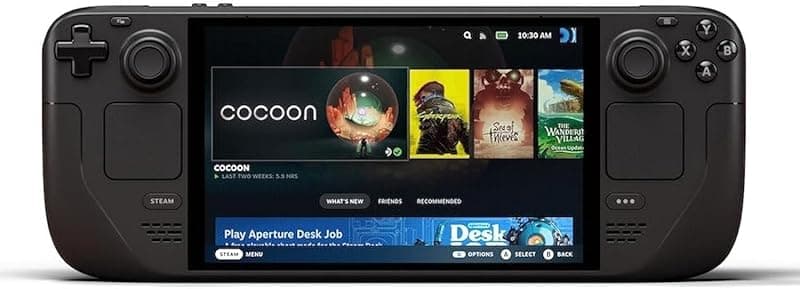
What can it run?
Runs Great
7 systems
- Native PC Games via Steam (huge verified library, AAA at 720p-800p 30-60fps)
- NES, SNES, GB, GBC, GBA (flawless)
- N64, PS1, Dreamcast (flawless)
- PSP (full library at high resolution)
- DS, 3DS (full library)
- GameCube/Wii (full library at high resolution)
- PS2 (full library at upscaled resolution)
Struggles
4 systems
- Wii U via Cemu (most games playable but some demanding titles dip)
- PS3 via RPCS3 (only lighter titles like Persona 5 — Zen 2 CPU is the bottleneck)
- Switch via Eden/Citron (some titles playable but very game-dependent)
- Saturn (most games via Beetle Saturn, some edge cases)
Can't Run
3 systems
- Xbox 360 via Xenia (no Linux port, Wine compatibility is poor)
- PS4/PS5 (no viable emulators)
- Xbox One/Series (no viable emulators)
Specs
Recommended Emulators
Excellent
Good
Setup Guide
The Verdict
The Steam Deck OLED is the best emulation handheld for most people. Not the most powerful — but the software experience is unmatched. SteamOS just works. EmuDeck makes emulator setup trivial. The OLED screen is gorgeous. And at $549, it's cheaper than most Windows handhelds with worse software. If you want one device that plays your Steam library AND emulates everything up to PS2/GameCube flawlessly, this is the one.
First Thing to Do
1. **Complete SteamOS setup** — Connect WiFi, sign into Steam, let it update
2. **Switch to Desktop Mode** — Hold power button > Desktop Mode
3. **Install EmuDeck** — Go to emudeck.com in the browser, download, run. It configures RetroArch, Dolphin, PCSX2, PPSSPP, Azahar, RPCS3, and more automatically
4. **Install Decky Loader** — Adds plugins to Gaming Mode (PowerTools for TDP control, SteamGridDB for art)
5. **Set up your ROM folder** — EmuDeck creates folders on your SD card. Drop ROMs in, run Steam ROM Manager to add them to your library
6. **Install CryoUtilities** — Free performance boost, optimizes swap and memory
Emulation Setup
EmuDeck handles 90% of this. After running it:
→**PS2:** PCSX2 — 2x resolution for most games, 3x for lighter ones. EmuDeck preconfigures this perfectly
→**GameCube/Wii:** Dolphin — Full speed at native or 2x. Wind Waker, Metroid Prime, all perfect
→**PSP:** PPSSPP — 3x resolution, looks incredible on the OLED
→**3DS:** Azahar — Great performance, configure controls in Desktop Mode first
→**PS1:** Duckstation via RetroArch — Enhanced resolution, the OLED makes PS1 games pop
→**Everything older:** RetroArch — SNES, Genesis, GBA, N64, all flawless
Native PC Gaming
This is where Steam Deck shines. Your entire Steam library is here. Verified games just work. For non-Steam games, add them manually or use Heroic Launcher for Epic/GOG. Most 2020-era AAA games run at 800p 30-40fps. Indie games? Buttery smooth.
Pro Tips
1. **Use PowerTools via Decky Loader** — Drop TDP to 8W for retro games, battery jumps to 5-6 hours. Crank to 15W for demanding stuff
2. **The OLED screen at 90Hz is a game-changer** — Enable 90Hz in settings, then use it for GameCube/Wii games that hit 60fps — the extra headroom eliminates frame pacing issues
3. **Get a 512GB+ SD card** — A2 speed class. Samsung EVO Select or SanDisk Extreme. Your internal storage fills fast
4. **Skip Xenia/Xbox 360** — No Linux port, Wine compatibility is terrible. This is the one gap
5. **Use per-game profiles in EmuDeck** — Some PS2 games need software rendering. Set those individually instead of changing global settings
Worth It?
The Steam Deck OLED is the easiest recommendation in handhelds. The software polish alone puts it ahead of every Windows handheld. You lose Xbox 360 emulation and raw power compared to Z1 Extreme devices, but you gain an experience that just works out of the box. For $549, nothing else comes close to this value.
Setup Tips
- →Best plug-and-play experience — SteamOS is optimized for gaming out of the box
- →Install EmuDeck in Desktop Mode for one-click emulator setup
- →HDR OLED screen is the best display on any handheld at this price
- →90Hz display is noticeably smoother than 60Hz
- →Huge Steam Verified library means most PC games 'just work'
- →microSD card slot for expandable storage
- →Can install Windows via dual-boot but SteamOS is recommended
Watch Out For
- !Zen 2 CPU is aging — weaker than Z1 Extreme for emulation
- !800p resolution is low compared to competitors
- !Linux-based — some Windows-only emulators (Xenia) don't work natively
- !Battery life is 2-4 hours depending on game
- !Large and heavy (640g) — not pocketable
- !No Windows by default — some emulators need Proton/Wine compatibility layer