Retroid Pocket Flip 2
$199
Clamshell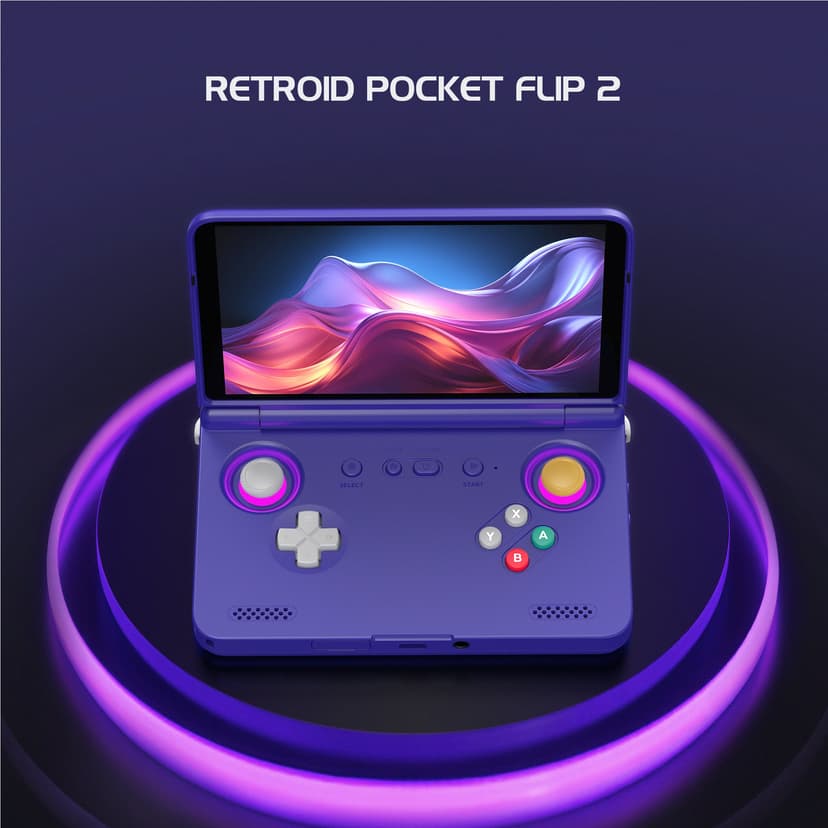
What can it run?
Runs Great
13 systems
- NES, SNES, GB, GBC, GBA
- Sega Genesis, Game Gear, Master System
- N64 (full library)
- PS1 (full library)
- PSP (full library at 2-3x resolution)
- DS (full library)
- Dreamcast (full library)
- Saturn (most titles)
- GameCube (most titles at native resolution)
- PS2 (many titles at native/2x resolution)
- 3DS (most titles)
- Wii (many titles at native resolution)
- Arcade: MAME, FBNeo, Atomiswave, Naomi
Struggles
6 systems
- GameCube (demanding titles like F-Zero GX, Rogue Squadron)
- PS2 at 3x resolution
- 3DS (demanding titles like Pokémon X/Y)
- Wii (demanding titles like Skyward Sword)
- Switch (lighter titles only via Eden/Citron — 2D games, lighter 3D)
- Wii U via Cemu Android (only simple 2D games may be playable — very early Android port)
Can't Run
3 systems
- PS3
- Xbox 360
- Switch (demanding titles like TOTK, Xenoblade)
Specs
Recommended Emulators
Excellent
Good
Setup Guide
The Verdict
This is the perfect travel companion for someone who wants GameCube and PS2 in their pocket without sacrificing screen protection. The clamshell design is polarizing — you either love it or you don't. I've been daily-driving the Flip 2 for months and it's my go-to airplane device. If you want power in a pocketable package and don't mind the GBA SP vibes, this is it.
First Thing to Do
1. **Update the firmware** — Retroid ships updates frequently, get the latest before anything else
2. **Install Daijishō** — Best Android frontend, bar none. Skip the stock launcher
3. **Download NetherSX2** — PS2 emulation is shockingly good on this thing
4. **Grab Dolphin MMJR2** — The MMJR2 fork runs GameCube way better than mainline
5. **Set up RetroArch** — For everything pre-N64, this is your one-stop shop
The Loadout
→**PS1:** Duckstation (enhanced resolution looks gorgeous)
→**PS2:** NetherSX2 (most games run at native, some at 2x)
→**PSP:** PPSSPP (locked 60fps, no sweat)
→**GameCube:** Dolphin MMJR2 (stick to native resolution for best performance)
→**Wii:** Dolphin MMJR2 (many titles run well at native res)
→**N64:** M64Plus FZ (RetroArch's Mupen core also works great)
→**Dreamcast:** Flycast (flawless)
→**Saturn:** Yaba Sanshiro (skip the tough ones)
→**3DS:** Azahar or Citra MMJ (most games run fine, lower resolution if needed)
→**DS:** DraStic (absolute perfection)
→**Switch:** Eden or Citron (lighter titles only — think 2D games and lighter 3D)
→**GBA/SNES/Genesis/NES:** RetroArch cores
What It Crushes
→**PS1/PSP/Dreamcast** — These run like butter. Zero complaints.
→**16-bit era** — SNES, Genesis, GBA? Forget about it. Perfect.
→**DS games** — The clamshell form factor is *chef's kiss* for DS games
→**GameCube at native res** — Mario Sunshine, Metroid Prime, Wind Waker all run great
What It Struggles With
→**PS2 upscaling** — Native res is fine, but don't expect 3x resolution on demanding games
→**Heavy 3DS titles** — Pokémon X/Y will chug in battles without tweaks
→**GameCube gems like F-Zero GX** — Expect frame drops
→**Switch** — Lighter titles work via Eden/Citron, but demanding games won't
Skip These
→**PS3** — Not possible on Android
→**Xbox 360** — Not possible on Android
→**Demanding Switch games** — TOTK, Xenoblade are too much for this chip
Pro Tips
1. **The clamshell isn't just for show** — Toss this in your bag with zero fear. No screen protector needed.
2. **Hall effect sticks = no drift ever** — This is huge for long-term ownership. No Joy-Con nonsense.
3. **Use the trackpad for PS2/GameCube games** — Some menus are pointer-based, the trackpad saves you.
4. **Battery life hack:** Lower screen brightness to 60% and you'll get 5+ hours on PS1/GBA
5. **Wii games work better than expected** — Many first-party titles are fully playable
Setup Tips
- →Install RetroArch first for classic systems
- →Use NetherSX2 for PS2 emulation (AetherSX2 is discontinued)
- →GameCube runs well in Dolphin MMJR2 at native resolution
- →The clamshell design protects the screen when traveling
- →Hall effect sticks mean zero drift
- →Android 13 allows excellent emulator compatibility
- →Try Eden or Citron for lighter Switch titles
Watch Out For
- !Screen is only 720p (fine for retro, but lower than competitors)
- !Battery life is moderate (3-4 hours on demanding games)
- !Some 3DS games struggle without resolution tweaks
- !Clamshell adds bulk when open