MSI Claw 8 AI+
$799
Handheld PC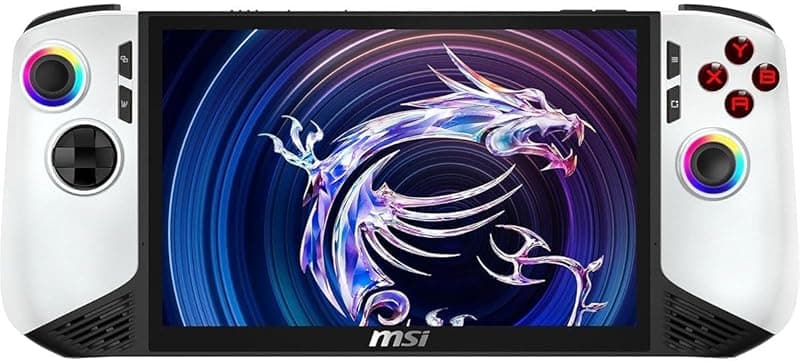
What can it run?
Runs Great
8 systems
- Native PC Games (AAA titles at 720p-1080p medium-high settings)
- NES, SNES, GB, GBC, GBA (flawless)
- N64, PS1, Dreamcast (flawless)
- PSP (full library at high resolution)
- DS, 3DS (full library)
- GameCube/Wii (full library at high resolution)
- PS2 (full library at upscaled resolution)
- Wii U (most games at full speed via Cemu)
Struggles
3 systems
- PS3 via RPCS3 (many titles playable but CPU-intensive, Intel iGPU can struggle)
- Xbox 360 via Xenia (experimental, game-dependent)
- Switch via Eden/Citron (lighter titles run well, demanding titles struggle — Intel GPU compatibility issues)
Can't Run
2 systems
- PS4/PS5 (no viable emulators)
- Xbox One/Series (no viable emulators)
Specs
Recommended Emulators
Excellent
Good
Setup Guide
The Verdict
The MSI Claw 8 AI+ is the Intel option in a sea of AMD handhelds. The Lunar Lake chip (Core Ultra 7 258V) is power-efficient and surprisingly capable, but Intel's GPU drivers for emulation are a mixed bag. If you're mostly playing native PC games and retro stuff through PS2, it's great. If you want PS3 or Switch emulation, look elsewhere — Intel iGPU compatibility is the weak link.
First Thing to Do
1. **Update Intel drivers immediately** — MSI Center or Intel's Arc driver page. Intel ships driver updates frequently and they matter more here than on AMD
2. **Install MSI Center** — Actually decent for TDP management on this device
3. **Install Handheld Companion** — Backup option if MSI Center's controller mapping frustrates you
4. **Install Playnite** — Unified launcher, essential for any Windows handheld
5. **Disable Intel's AI features you don't need** — The "AI+" branding comes with bloatware. Uninstall what you don't use
Emulation Setup
→**PS2:** PCSX2 — 2x-3x resolution. Runs great, Intel GPU handles Vulkan well here
→**GameCube/Wii:** Dolphin — Full speed at 2x-3x. Dolphin's Vulkan backend works well on Intel
→**Wii U:** Cemu — Most games at full speed. Use Vulkan backend, not OpenGL
→**PSP:** PPSSPP — Max resolution, no issues
→**3DS:** Azahar — Full library, smooth
→**PS3:** RPCS3 — Here's where it gets rough. Intel's iGPU has compatibility issues with RPCS3. Some games work, many have graphical glitches. Don't buy this device for PS3 emulation
→**Switch:** Eden or Citron — Similar story. Intel GPU driver issues cause compatibility problems. Lighter titles work, but you'll hit more bugs than on AMD
→**Xbox 360:** Xenia — Experimental on Intel. Game-dependent
→**Everything older:** RetroArch — Flawless
Native PC Gaming
This is where Lunar Lake surprises. The integrated GPU is competitive with AMD's Radeon 780M in many titles, and the power efficiency is better. AAA games at 720p medium-high settings, 30-60fps depending on the title. The 8-inch screen looks great. Intel XeSS upscaling works in supported games and is genuinely good.
Pro Tips
1. **Use Vulkan everywhere** — Intel's OpenGL drivers are weak. Always pick Vulkan in emulators and games that support it
2. **Lunar Lake's efficiency is the selling point** — At 15W you get performance that AMD needs 20W for. Battery life is genuinely good: 3-4 hours for PC games, 5+ hours for retro
3. **Keep Intel drivers updated religiously** — Intel fixes emulator compatibility bugs in driver updates. Check monthly
4. **The 8-inch screen is IPS, not OLED** — Good but not stunning. Bump up vibrance in Intel Graphics settings for retro games
5. **XeSS is your secret weapon** — In native PC games that support it, XeSS gives you 20-30% more performance free
Worth It?
The Claw 8 AI+ is a solid device held back by Intel's emulation compatibility. For native PC gaming and retro through PS2/Wii U, it's actually great — efficient, good battery life, nice screen. But if PS3, Switch, or Xbox 360 emulation matters to you, the AMD-based competition (Ally X, Legion Go S) is simply more compatible. At $799, it's a tough sell against the Ally X at the same price.
Setup Tips
- →First Intel Lunar Lake handheld to get right — 80Wh battery is class-leading
- →Intel Arc 140V iGPU is competitive but has driver quirks with some emulators
- →Use MSI Center for TDP tuning
- →Install EmuDeck for easy emulator setup on Windows
- →8-inch screen is great for desktop mode and emulation
Watch Out For
- !Intel GPU driver compatibility can lag behind AMD for some emulators
- !Lunar Lake is efficient but less raw GPU power than AMD Z1 Extreme
- !MSI software (MSI Center) can be bloated
- !Previous MSI Claw had poor reviews — verify improvements before buying
- !Large and heavy for a handheld