Lenovo Legion Go S
$499
Handheld PC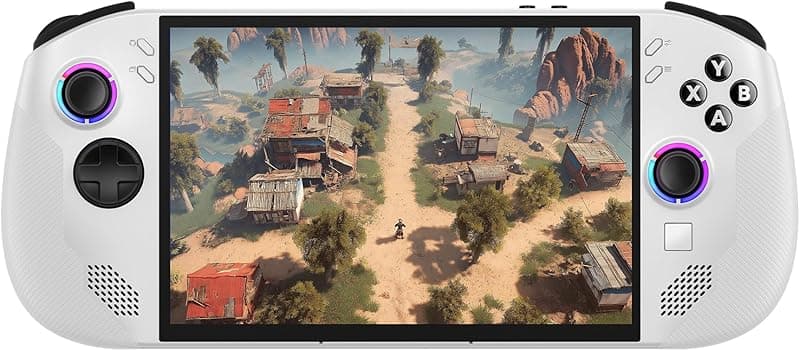
What can it run?
Runs Great
7 systems
- Native PC Games (indie and older AAA at 720p medium settings)
- NES, SNES, GB, GBC, GBA (flawless)
- N64, PS1, Dreamcast (flawless)
- PSP (full library at high resolution)
- DS, 3DS (full library)
- GameCube/Wii (full library at high resolution)
- PS2 (full library at upscaled resolution)
Struggles
3 systems
- Wii U via Cemu (most games playable but demanding titles may dip)
- Switch via Eden/Citron (lighter titles only — Z2 Go has limited GPU power)
- Native PC AAA games from 2022+ (low settings required)
Can't Run
4 systems
- PS3 via RPCS3 (Z2 Go lacks the CPU power for most titles)
- Xbox 360 via Xenia (too demanding for this chipset)
- PS4/PS5 (no viable emulators)
- Xbox One/Series (no viable emulators)
Specs
Recommended Emulators
Excellent
Good
Setup Guide
The Verdict
The Legion Go S is Lenovo's budget entry into Windows handhelds, and the Z2 Go chip shows it. This is NOT a powerhouse — it's a mid-range device that handles PS2, GameCube, and native indie games well, but falls flat on PS3, Xbox 360, and demanding emulation. At $499, it's the cheapest Windows handheld worth buying, but know what you're getting into.
First Thing to Do
1. **Windows updates** — Get them done. All of them
2. **Install Lenovo Vantage** — Updates drivers and firmware
3. **Install Handheld Companion** — Lenovo's Legion Space software is mediocre. Handheld Companion gives better TDP control
4. **Install Playnite** — Clean launcher for all your games and emulators
5. **Disable unnecessary Windows services** — Search indexing, Cortana, Xbox Game Bar. Every watt matters on this chip
Emulation Setup
→**PS2:** PCSX2 — 2x resolution for most games, some can do 3x. The Z2 Go handles PS2 well
→**GameCube/Wii:** Dolphin — Full speed at 2x resolution. Most of the library runs great
→**Wii U:** Cemu — Playable but demanding titles like BOTW will dip. Stick to native resolution
→**PSP:** PPSSPP — 3x resolution, smooth
→**3DS:** Azahar — Full library, no problems
→**PS1:** Duckstation — Enhanced resolution, flawless
→**Everything older:** RetroArch — Perfect
Skip RPCS3, Xenia, and Switch emulation on this device. The Z2 Go doesn't have the CPU or GPU power. You'll waste time configuring something that runs at 15fps.
Native PC Gaming
Indie games and older AAA titles are the sweet spot. Hades, Stardew Valley, Hollow Knight — all perfect. Older AAA (2018 and before) at 720p low-medium. Don't expect to play Elden Ring or Starfield. This isn't that device. Xbox Game Pass works great for lighter titles.
Pro Tips
1. **Keep TDP at 8-12W for emulation** — The Z2 Go doesn't benefit much from cranking higher. You'll just drain battery faster with minimal performance gain
2. **Use FSR aggressively** — AMD's upscaling is your best friend on this chip. Set games to 540p with FSR Quality and it looks decent on the 8-inch screen
3. **The 8-inch screen is great for emulation** — Bigger than most handhelds, makes DS and 3DS dual-screen games actually playable
4. **Get a fast SD card for ROM storage** — Keep Windows and emulators on internal storage, ROMs on SD
5. **Consider SteamOS** — Lenovo offers a SteamOS version. If you don't need Windows-specific stuff, it's a much better experience
Worth It?
The Legion Go S makes sense at $499 if you want a big-screen Windows handheld for PS2/GameCube emulation and indie PC games. It does NOT make sense if you want PS3, Xbox 360, or demanding Switch emulation — save up for an Ally X or Steam Deck OLED instead. The SteamOS version is honestly the better buy if it's available in your region.
Setup Tips
- →Budget-friendly Windows handheld — great entry point
- →Z2 Go is less powerful than Z1 Extreme but very power efficient
- →8-inch 120Hz screen is excellent for the price
- →Install Lenovo Legion Space for TDP and fan control
- →Pair with a microSD card for extra game storage
Watch Out For
- !Z2 Go is significantly weaker than Z1 Extreme — don't expect ROG Ally-level performance
- !RDNA 2 integrated graphics, not RDNA 3
- !No detachable controllers like the original Legion Go
- !16GB RAM is adequate but not generous for heavy emulation + Windows overhead
- !SteamOS variant exists but Windows version is more common