GPD Win 4 (2023)
$830-1100
Handheld PC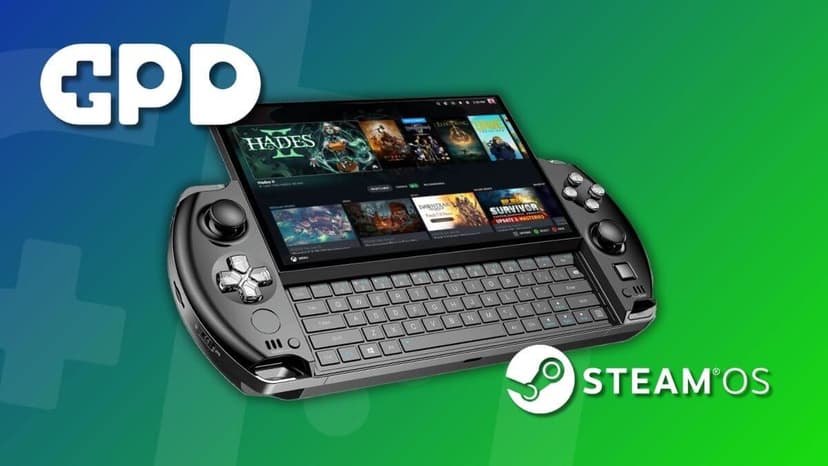
What can it run?
Runs Great
8 systems
- Native PC Games (AAA at 720p medium settings)
- NES, SNES, GB, GBC, GBA (flawless)
- N64, PS1, Dreamcast (flawless)
- PSP (full library at high resolution)
- DS, 3DS (full library at high resolution)
- GameCube/Wii (full library at high resolution)
- PS2 (full library at upscaled resolution)
- Wii U (full library via Cemu)
Struggles
3 systems
- PS3 via RPCS3 (lighter titles at 30fps, demanding games struggle)
- Xbox 360 via Xenia (game-dependent)
- Switch via Eden/Citron (lighter titles playable, demanding ones need tweaking)
Can't Run
2 systems
- PS4/PS5 (no viable emulators)
- Xbox One/Series (no viable emulators)
Specs
Recommended Emulators
Excellent
Good
Setup Guide
The Verdict
The GPD Win 4 is a weird, wonderful device. It's got a slide-out physical keyboard, a 6-inch screen, and the form factor of a chunky PSP. The Ryzen 7 7840U is plenty powerful for emulation up through Wii U, and it handles native PC games respectably. This is for the person who wants a pocket PC that also games — not just a gaming handheld.
First Thing to Do
1. **Update GPD's drivers** — Check gpd.hk for the latest driver pack. GPD's stock drivers are often outdated
2. **Install MotionAssistant or Handheld Companion** — GPD's built-in software is rough. You need proper TDP and controller mapping
3. **Install Playnite** — Essential for making Windows feel like a gaming console
4. **Remap the back buttons** — The Win 4's back paddles are useful but need manual mapping
5. **Set display scaling to 100%** — The 1080p 6-inch screen defaults to 150% scaling, which breaks some emulators
Emulation Setup
→**PS2:** PCSX2 — 3x resolution, full speed. The 7840U handles PS2 beautifully
→**GameCube/Wii:** Dolphin — 2x-3x resolution, everything runs
→**Wii U:** Cemu — Full library at native or higher. BOTW with 60fps mod works well at 15W TDP
→**PSP:** PPSSPP — Max resolution on the 1080p screen looks amazing
→**3DS:** Azahar — Perfect. The small screen actually works well for 3DS since the resolution matches nicely
→**PS3:** RPCS3 — Lighter titles at 30fps. Persona 5, Ni no Kuni playable. Skip demanding stuff
→**Xbox 360:** Xenia Canary — Game-dependent. Worth trying your favorites
→**Switch:** Eden or Citron — Lighter titles work. Don't expect miracles
→**Everything older:** RetroArch
Native PC Gaming
The 7840U's Radeon 780M handles more than you'd think. Steam Deck-level performance at 720p. The 1080p screen means you're upscaling, but FSR helps. Older AAA games at medium settings, modern games at low 720p. The keyboard is genuinely useful for PC games that need text input.
Pro Tips
1. **The keyboard is the killer feature** — Use it for emulator configuration, game mods, file management. No other handheld gives you this
2. **TDP sweet spots: 8W for retro (4+ hours), 15W for PS2/GC/Wii U (2.5 hours), 25W for PC games (1.5 hours)**
3. **The 6-inch screen is small but sharp** — 1080p at 6 inches means incredible pixel density. Retro games with CRT shaders look phenomenal
4. **Active cooling is loud** — Set fan curves in MotionAssistant. Passive mode works for retro games
5. **Use the built-in fingerprint reader** — Skip typing your Windows password on boot
Worth It?
The GPD Win 4 is a niche device for niche people — and that's fine. If you want the most pocketable Windows handheld with a real keyboard, nothing else competes. The emulation performance is excellent through Wii U, and the keyboard makes configuration painless. At $830+, it's expensive for what it is, but GPD fans know what they're paying for.
Setup Tips
- →PSP-style slide-up design reveals a full QWERTY keyboard
- →OCuLink port for external GPU — turns it into a desktop
- →6-inch screen keeps it compact and pocketable
- →Same Ryzen 7 7840U as many flagship handhelds of 2023
- →Install EmuDeck for easy emulator configuration
- →Backlit keyboard is great for desktop mode
Watch Out For
- !6-inch screen feels small for some users
- !GPD quality control is inconsistent — check reviews before buying
- !Slide-up keyboard mechanism adds complexity
- !No built-in kickstand
- !Battery life is 2-3 hours for demanding games
- !Expensive for what it offers compared to Steam Deck